Pixar Shows off Stereoscopic Footage

At Monday’s Pixar Animation Studios Case Study at the Content Theater, the company focused on stereoscopic production and presentation.

The packed event, sponsored by Sony and RealD’s 4K 3D projection system, offered glimpses of Pixar’s first experiments with 3D, included re-created scenes from “Toy Story” and “Ratatouille,” adding new 3D effects as well as extended sequences from Pixar’s upcoming stereoscopic release, “Up.”

Bob Whitehill, stereoscopic supervisor, and Josh Hollander, director of stereoscopic production, shared some of preparation for the May 29 release of “Up” and the Oct. 2 premiere of the stereoscopic versions of “Toy Story” and “Toy Story 2.”

In re-creating the “Toy Story” films, Hollander said, Director John Lasseter worked with the stereoscopic team on creative and technical issues that arose when taking a show designed for 2D projection and adapting it to 3D.

Significant technical consideration arise from the need to render images for the left and right “eye” simultaneously because of the damage to the stereoscopic effect that could result from even extremely minute changes at the pixel level if the two perspectives are rendered separately.

Looking at the stereoscopic world from an artistic perspective, Whitehill noted that Pixar’s initial testing helped Pixar filmmakers define a stereoscopic aesthetic using concepts such as “point of interest” and its relation to the “point of conversion” and “depth budget” that became integral to the decisions made by co-directors Pete Doctor and Bob Peterson when creating “Up.”

Disney HP Experience – Interactive Microsite

This was a fun interactive site that lead the user through an experience, in which they were able to use a canon printer or camera to take them through a set of activities detailing the products capabilities. This was one of my very first flash development products that I did years back at a large interactive firm here in Chicago. I worked alongside an art director and the CD to develop this site and to ensure the animation would be approved by Disney. This site was developed in Flash MX and used AS2.0.

JonaDel678.com – Full Website

Here is one of my favorite sites in which I helped developed. This was actually for a close family friend’s wedding. I wanted the site to be developed to engulf the whole screen and have a very calm and clean look/feel. This site was developed in Flash 8 using AS2.0 and PHP. There was a message board built into this piece and a dynamic photo section.

Innovative Dermatology – Full Website

This was a site I developed a couple years back actually. Great group of people at this clinic, it started out with Dr. Thrash as the initial doctor then Dr. Krunic bought them out – either way they both new what they wanted to see in their site and saw the power and potential having a site would bring to their clinic. The site is still growing as the clinic continues to grow.

Google Gadget Development

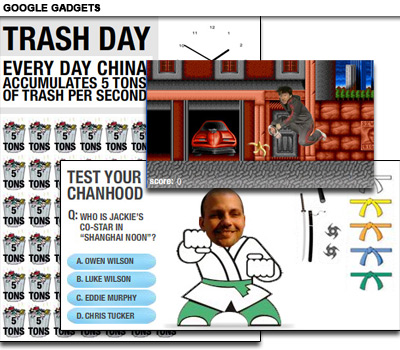
This was a fun project to take on with a great group in a smaller interactive agency here in Chicago. The project consisted of developing multiple Google Gadgets that people would be able to download and place into their iGoogle as applications. I developed games, clocks, quizzes and many other fun elements.

Gatorade – Flash component for site

Here is another flash component I designed for Gatorade that would live on their site. Its simply a nutritional and facts data sheet for the Powder Pack  product. Not sure if this is still currently on their site, I designed this piece over a year ago.

Five Reasons You Should Use Flash Video on Your Site

Flash Video is an accessible, fast-loading, pretty much globally supported video format. And, as the “official video format of YouTube,” Flash Video has emerged as the standard video format for the web. In this article, author Dave Karlins explains why you should use Flash Video on your site.

Before I explain why you should use Flash Video on your site, let me break that down just a bit. I’m going to explain why you should use Flash Video on your site. The “Flash Video” part will cover why this format is the best choice for sharing your videos online. And the “your site” part will explain why you can, and should, pop Flash Video files up on your own site, rather than sticking them up on YouTube.

Read more >>

Creating a Twitter Widget with Flash

With the help of ActionScript 3.0 and PHP, Kris Hadlock, author of Ajax for Web Application Developers, shows how easily you can add your tweets to your website.

Twitter usage is growing at a phenomenal rate—in just one year, Twitter grew by 1,382%. In January 2009, it received 4.5 million unique U.S. visitors. Recently I wrote an article called “Creating a Twitter Widget with Ajax,” which explained how to bridge the gap between a local website and remote RSS feed using PHP and Ajax. This article addresses the same concept, but we’ll be using Flash ActionScript 3.0 and PHP to create a handy Twitter widget for displaying your latest tweets on the Web.

It’s not a requirement, but we’ll assume that you’re already familiar with ActionScript 3.0 and PHP. If you need to get up to speed on ActionScript 3.0, check out my book The ActionScript 3.0 Migration Guide: Making the Move from ActionScript 2.0.

Go to the Tutorial >>

Flash CS5 Physics

Long are the days where a designer could simple explore flash and learn it. The current times and ActionScript 3 require some programming skills. Fortunately Flash CS5 includes a simple way to associate gravity behavior to objects making certain animations easier.

Flash CS5 introduces a whole bunch of new features in order to keep up to date with the current necessities in the development of RIAs and other software for Mobile hardware such as the iPhone.

The video after the jump will show some of Flash CS5 gaming capabilities and, starting at 3min50sec, an introduction to Flash CS5 physics.

Continue reading

How to Turn Humdrum Photos into Cinematic Portraits

There are a plethora of ways to treat a portrait for a myriad of uses, but that is for another feature. Let’s tackle adding drama or a cinematic quality to a regular, humdrum portrait. Let’s even throw in a little bit of faking HDR. That way if you work on a project that requires a stunning shot without the stunning photography, you’ll be able to cobble something together using your mad skillz!

Go to tutorial >>

Create dynamic distortion effects

Bring velocity and meltdown to your subjects with a little Photoshop magic. Doucin Pierre, aka Soemone, shows you how

I like to create dynamic work that conveys a sense of velocity in its subjects, and the visual featured in this tutorial is a prime example of that style.

In the following steps, I’ll let you in on one of the most effective and easily mastered techniques that I use to make striking, dynamic distortions of subjects – in this case I’ve used a model, although the technique can be adapted to any objects that you wish to feature in your work, such as cars or trees.

In this tutorial we’ll use brushes to create what look like stains of paint, but in your future work you can use similar techniques with any number of style forms to dissect and distort your subject.

Go to tutorial >>

Brace yourself for the real-time Web

London, England (CNN) — Real-time is a top 10 Web trend for 2010, I proposed in this column last week. Now the stage is set: Google this week launched real-time search, bringing live updates from Twitter, Facebook, MySpace and more into a scrolling pane in your Google search results.

How will the real-time trend evolve in 2010? Rapidly, no doubt. Why will it sweep the Web? Because it fuels our insatiable info-addiction.

Why real-time?

What’s driving this real-time trend anyway? In large part, lowered barriers to content creation: Posting a 140-character update to Twitter is so effortless that Web users are becoming conditioned to create.

They’ve learned to expect a response, too: The immediate feedback provided by Facebook comments and Twitter replies is an incentive to make continued contributions.

But the real answer may be in our heads. These technologies are literally addictive, says psychologist Susan Weinschenk, fueling a “dopamine-induced loop” of seeking behavior and instantaneous reward.

New email! Unread Tweets! New comment on your blog post! Each new alert is like Pavlov ringing a bell.

Real-time search

If this new paradigm stimulates our seeking behavior, it follows that search is central to the real-time Web. Before Google entered the fray, OneRiot and Collecta stood out among real-time search engines.

The reigning champion of real-time search, however, is Twitter Search, which provides instant updates whenever new Tweets are posted. “108 more results since you started searching. Refresh to see them,” implores a message below the search box. Enter the topic du jour here and you’ll no doubt find yourself in one of Weinschenk’s dopamine-induced loops.

This thirst for the new and novel is by no means limited to search, however: It looks set to pervade the entire Web in 2010. Let’s look at a few more examples. Continue reading

At a loss for words? Google offers search by sight

Mountain View, California (CNET) — Google’s first search engine let people search by typing text onto a Web page. Next came queries spoken over the phone.

On Monday, Google announced the ability to perform an Internet search by submitting a photograph.

The experimental search-by-sight feature, called Google Goggles, has a database of billions of images that informs its analysis of what’s been uploaded, said Vic Gundotra, Google’s vice president of engineering. It can recognize books, album covers, artwork, landmarks, places, logos, and more.

“It is our goal to be able to identify any image,” he said. “It represents our earliest efforts in the field of computer vision. You can take a picture of an item, use that picture of whatever you take as the query.”

However, the feature is still in Google Labs to deal with the “nascent nature of computer vision” and with the service’s present shortcomings. “Google Goggles works well on certain types of objects in certain categories,” he said.

Google Goggles was one of the big announcements at an event at the Computer History Museum here to tout the future of Google search. The company also showed off real-time search results and translation of a spoken phrase from English to Spanish using a mobile phone. Continue reading